
Everything You Need To Know About Razer Gold Gift Cards: The Ultimate Guide.


Razer Gold gift cards are popular among gamers who want to purchase games, in-game items and other digital content. They provide a convenient way to add funds to a Razer Gold wallet or pay for supported gaming products and services.
But how does Razer Gold work? Where can you buy Razer Gold gift cards? How do you redeem them, check their balance or sell them for cash in Nigeria?
This guide explains everything you need to know about Razer Gold, including its uses, card types, redemption process, regional restrictions and how to sell your Razer Gold gift card on Apex Network.
1. What Is Razer Gold?
Razer Gold is a virtual payment currency developed by Razer for purchasing games, in-game content and other digital entertainment products.
It is accepted across thousands of supported games and entertainment platforms. Instead of entering your bank card details every time you make a gaming purchase, you can use your Razer Gold wallet balance or an eligible Razer Gold PIN where supported.
Razer Gold is particularly useful for gamers who regularly purchase digital content and want a dedicated payment option for their gaming activities.
Users can also earn Razer Silver through eligible purchases and activities. Razer Silver is Razer's loyalty rewards currency, which can be redeemed for selected rewards and gaming content.
2. How Does Razer Gold Work?
Razer Gold works through a wallet-based payment system.
You create a Razer account, select the appropriate wallet region and add funds using a supported payment method, such as a Razer Gold PIN.
Once your wallet has been funded, you can use the available balance to pay for supported games, digital content and entertainment services.
The general process is:
- Create or sign in to your Razer Gold account.
- Select the correct wallet region.
- Purchase a supported Razer Gold PIN or use another available reload method.
- Redeem the PIN or reload your wallet.
- Browse supported games and digital content.
- Pay using your Razer Gold balance.
Razer Gold is not accepted everywhere. Always check whether the game or merchant supports Razer Gold and your wallet currency before purchasing a PIN.
3. Difference Between Razer Gold, Razer Gold PIN and Razer Gift Cards
These terms are often used interchangeably, but they do not always refer to the same thing.
Razer Gold: This is the virtual currency held in your Razer Gold wallet. You use it to purchase supported games and digital content.
Razer Gold PIN: This is a prepaid code that can be redeemed to reload a Razer Gold wallet in the supported region or used for direct top-ups at participating merchants.
Razer Gift Card: This is a separate gift card product that can be used for eligible purchases on Razer.com, at participating RazerStores or to reload a Razer Gold wallet where supported. Its usage depends on the card's terms and region.
Understanding these differences is important when purchasing, redeeming or selling a Razer-related gift card.
4. Types of Razer Gold Gift Cards
Razer Gold cards may be available in different formats depending on the retailer and market.
Physical Razer Gold Gift Cards
Physical cards are purchased from participating retail stores or other authorised sellers.
They usually contain a printed redemption code, which may be covered by a scratch-off section.
Before using or trading a physical card, ensure the code is readable and the card has been properly activated where activation is required.
Razer Gold E-Code
An electronic code, also called an e-code, is delivered digitally, usually through email or an online retailer's platform.
Unlike a physical card, there is no printed card to present. The buyer receives the code electronically.
On Apex Network, users can select the appropriate card type when starting a Razer Gold trade.
Important: Physical and electronic formats do not automatically have the same resale value. The final payout depends on the card's region, type, denomination and Apex Network's current trading rate.
5. Available Razer Gold Gift Card Denominations
Razer Gold PINs and gift cards are offered in different denominations depending on the region and retailer.
Commonly encountered denominations include:
- $10
- $20
- $50
- $100
- $200
- $500
Availability can vary, so these should not be treated as a universal list.
When purchasing a card, confirm its denomination, currency, issuing region and intended redemption method.
6. What Can You Buy with Razer Gold?
Razer Gold can be used to purchase supported games, gaming credits and digital entertainment content.
Depending on your region and the participating merchant, examples may include:
- In-game currencies.
- Game credits and top-ups.
- Gaming items and upgrades.
- Digital entertainment content.
- Other products listed in the Razer Gold catalogue.
Popular gaming titles and services may have different payment requirements and regional restrictions.
Before purchasing a Razer Gold PIN, check the official catalogue to confirm that your intended game or service accepts it.
Official resource: https://gold.razer.com/gold/catalog
7. How to Redeem a Razer Gold Gift Card
Redeeming a Razer Gold PIN allows you to add funds to your Razer Gold wallet.
Follow these steps:
- Visit https://gold.razer.com/.
- Sign in to your Razer Gold account.
- Select the Reload option.
- Choose Razer Gold PIN as your payment method.
- Enter the PIN code.
- Follow the on-screen instructions and complete any required authentication.
- Confirm the transaction.
Once the reload is successful, the funds should appear in your Razer Gold wallet.
Important things to remember:
- Enter the PIN, not the card's serial number.
- Confirm that the PIN matches your wallet region.
- Do not attempt to redeem a PIN that has already been used.
- Never share your PIN or account password with strangers.
The redemption process may differ for a Razer Gift Card. Follow the appropriate redemption instructions for the specific product.
8. Where Can You Buy Razer Gold Gift Cards Online?
You can purchase Razer Gold gift cards and PINs through participating online and offline retailers.
Some purchasing options include:
Razer's official website: Razer provides information about its products, supported reload methods and available purchasing options.
Authorised digital retailers: Some online stores sell Razer Gold PINs and deliver the codes electronically.
Participating retail stores: Physical Razer Gold cards may be available through selected gaming and technology retailers.
Before purchasing, check the following:
- Is the seller legitimate?
- Does the PIN match your intended wallet region?
- Is the denomination correct?
- Does the seller provide proof of purchase?
- Are the refund and replacement policies clear?
Avoid buying codes from suspicious sellers offering unusually low prices.
9. How to Check Your Razer Gold Gift Card Balance
There is an important difference between checking an unused gift card's balance and checking the balance of an already-funded Razer Gold wallet.
Method 1: Check an eligible Razer Gift Card balance
For eligible Razer Gift Cards, use Razer's official balance-checking service.
Visit Razer's official website and follow the gift card balance-checking instructions. You may need to sign in and provide the requested card details.
Official support: https://gold.razer.com/global/en/help
Method 2: Check your Razer Gold wallet balance
If you have already redeemed a PIN, check the available balance in your Razer Gold account.
- Visit https://gold.razer.com/.
- Sign in with your Razer ID.
- Open your account summary or wallet.
- Check your available Razer Gold balance.
Your wallet balance shows the funds that have been successfully credited to your account.
Method 3: Contact Razer Customer Support
If you cannot verify your card or wallet balance, contact Razer Gold Support.
Provide the relevant purchase receipt, card information and error message requested by the support team.
Never share your account password with anyone claiming to help you check your balance.
10. Razer Gold US vs Global: What's the Difference?
Razer Gold PINs and wallets have regional restrictions.
A PIN purchased for one region may not work with a wallet registered in another region.
For example, Razer's support documentation specifies that Razer Gift Card PINs are redeemable to US-region wallets only, while other Razer Gold PINs must match the applicable wallet region.
This is why checking the card's issuing region before purchasing or redeeming it is important.
Also, Razer states that wallet regions cannot currently be changed. If you selected the wrong region, you may need to create a new wallet under the correct region.
Before buying or trading a Razer Gold card, confirm its country, currency and card type.
11. How Much Is a Razer Gold Gift Card Worth in Nigeria?
The value of a Razer Gold gift card in Nigerian Naira depends on several factors.
These include:
- The card's denomination.
- The issuing country or region.
- Whether it is a physical card or e-code.
- The current demand for that card.
- The trading platform's exchange rate.
For example, a $100 Razer Gold card does not necessarily have the same resale value across every trading platform.
To estimate how much you can receive in Naira, check the current Razer Gold rate on Apex Network.
Check your current rate here: apexnetwork
You can select the relevant gift card details and enter the amount to see the estimated payout before starting a trade.
Remember that gift card rates can change, so always check the current rate rather than relying on figures published in older articles.
12. Where Can I Sell My Razer Gold Gift Card for Cash in Nigeria?
If you have a Razer Gold gift card you no longer need, you can exchange it for cash through a gift card trading platform.
Apex Network allows users to trade supported gift cards and receive payment into their selected wallet.
You can access Apex Network through its website or mobile application.
Trade your Razer Gold gift card on Apex Network here.
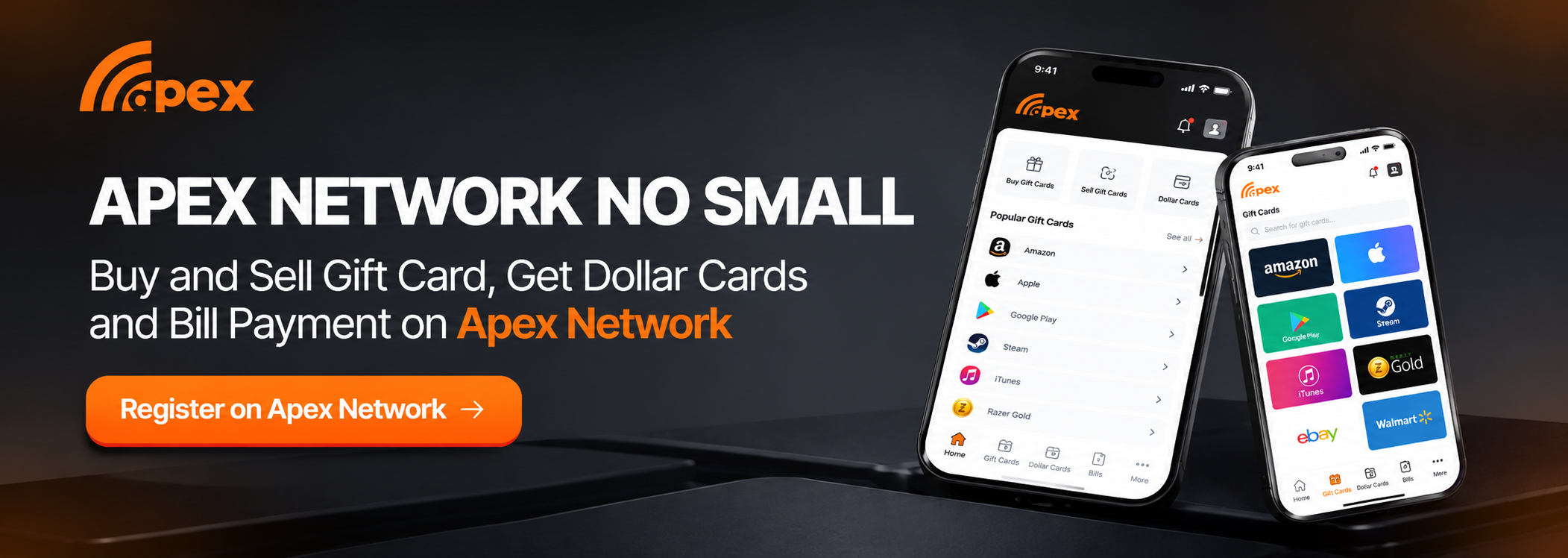
Before starting your trade, check the available card options and current rates.
Apex Network also supports gift card trading in other markets, including Ghana, Kenya, Zambia and Cameroon, subject to product availability.
13. How to Sell Razer Gold Gift Cards on Apex Network
Selling your Razer Gold gift card on Apex Network involves selecting the correct card details, submitting the code and completing the trade.
Follow these steps:
Step 1. Visit the Apex Network website or open the mobile application.
Step 2. Create an account if you are a new user.
Step 3. Log in to your Apex Network dashboard.
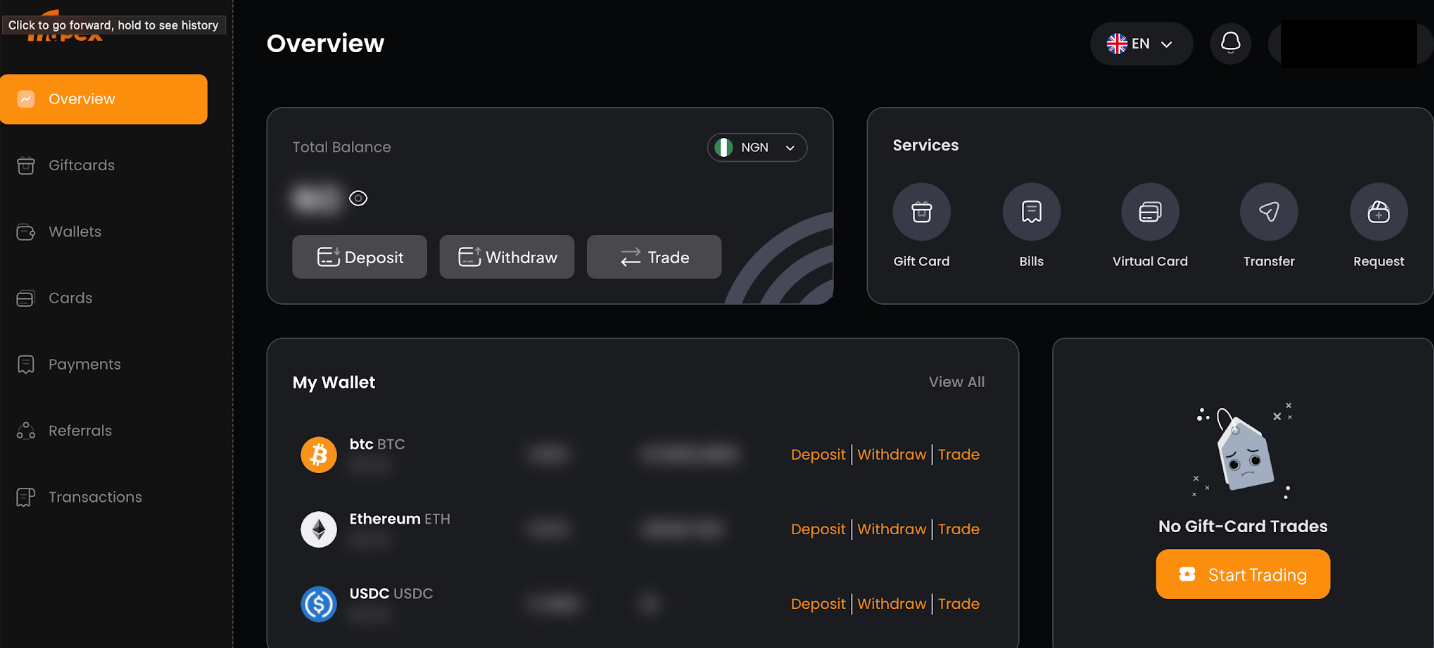
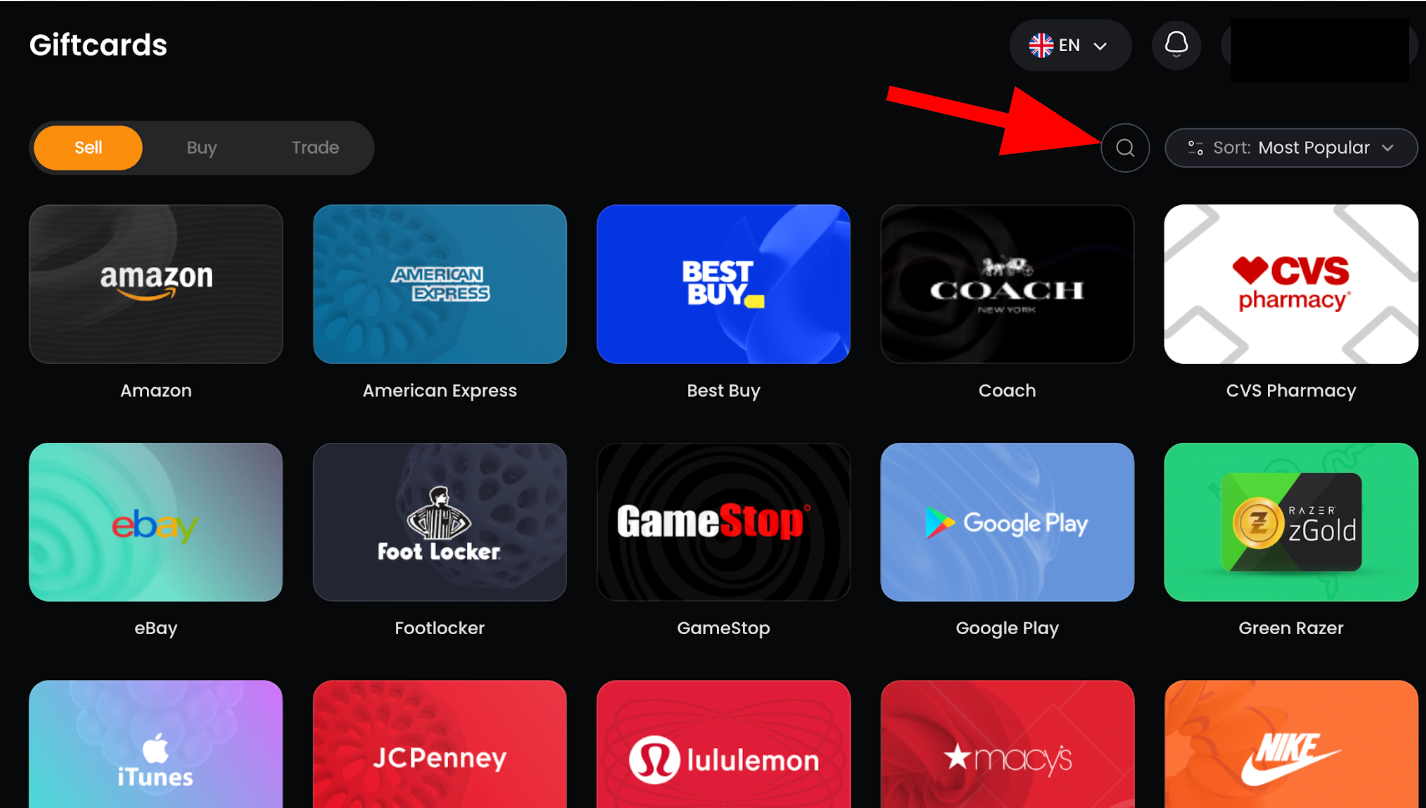
Step 4. Navigate to the Gift Cards section.
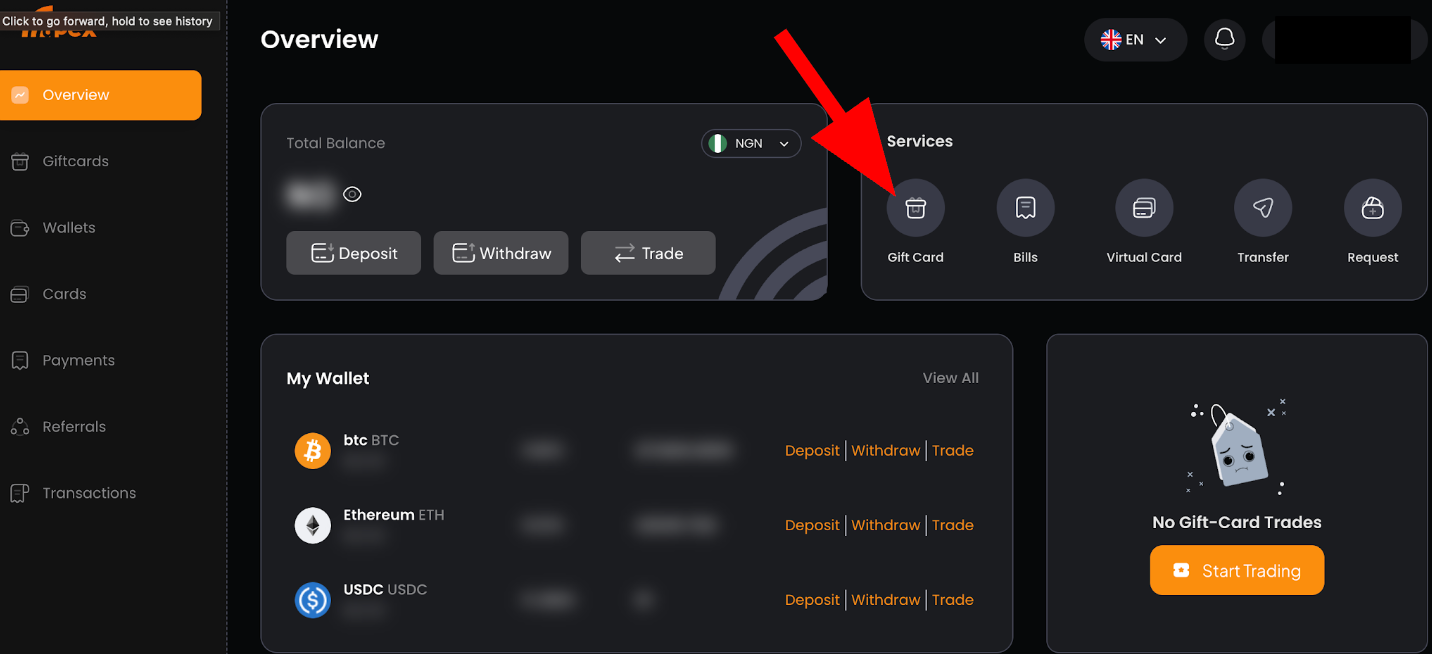
Step 5. Tap Gift Card
Step 6 Tap Sell Gift Card
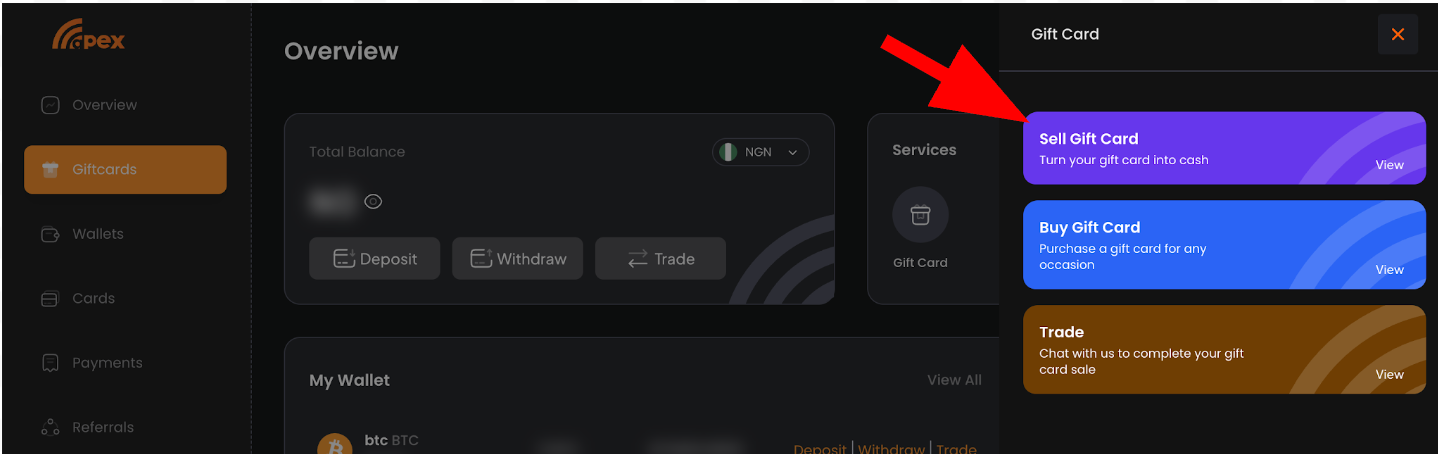
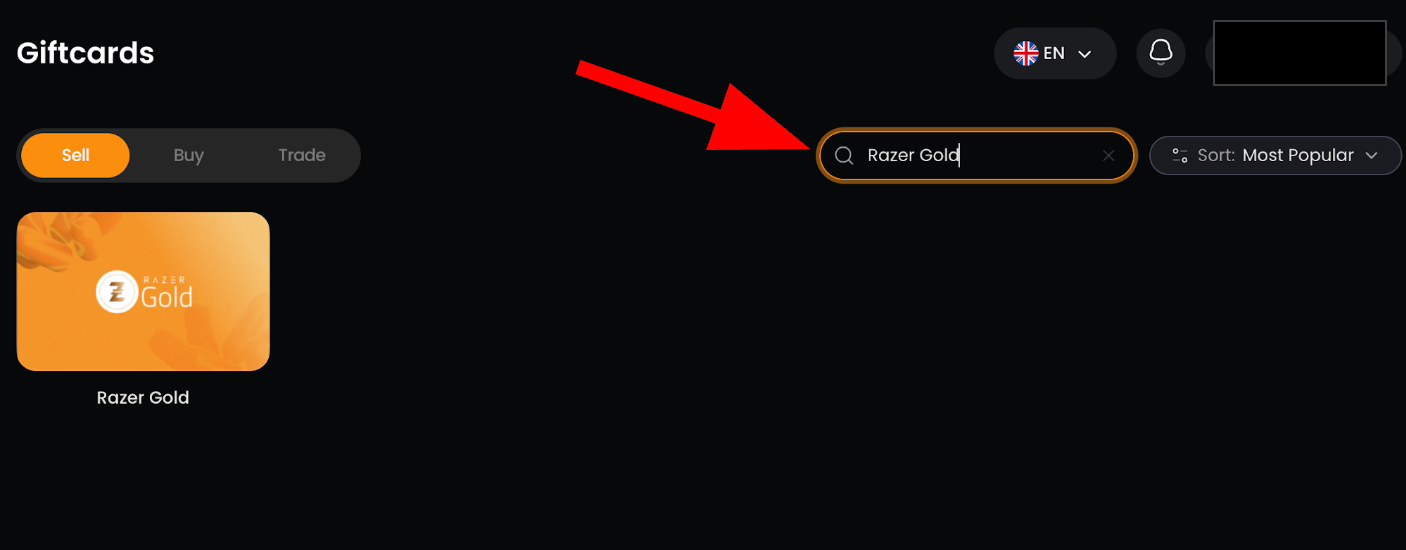
Step 7. Search for Razer Gold then select Razor Gold from the available options.
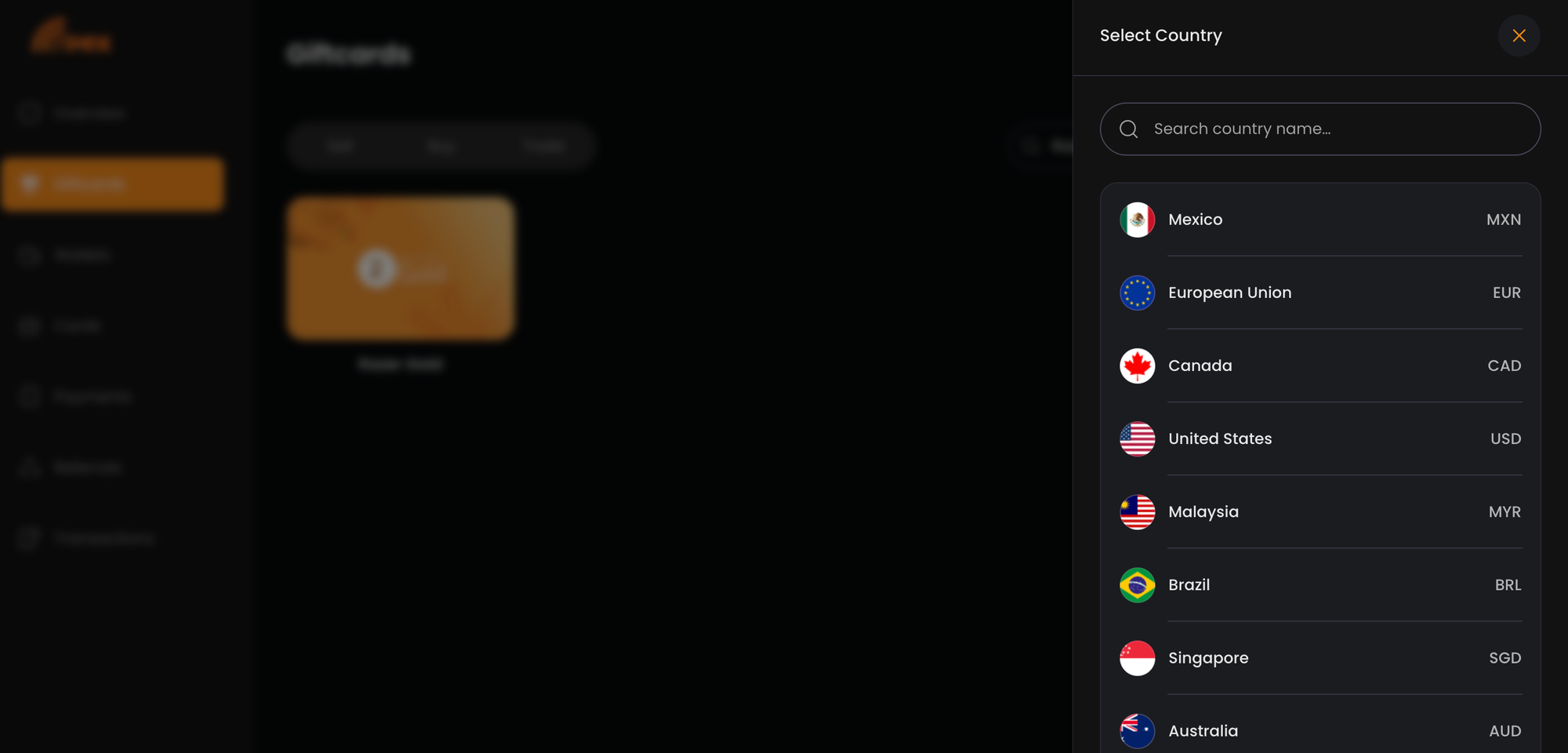
Step 8. Select the country or region of your gift card
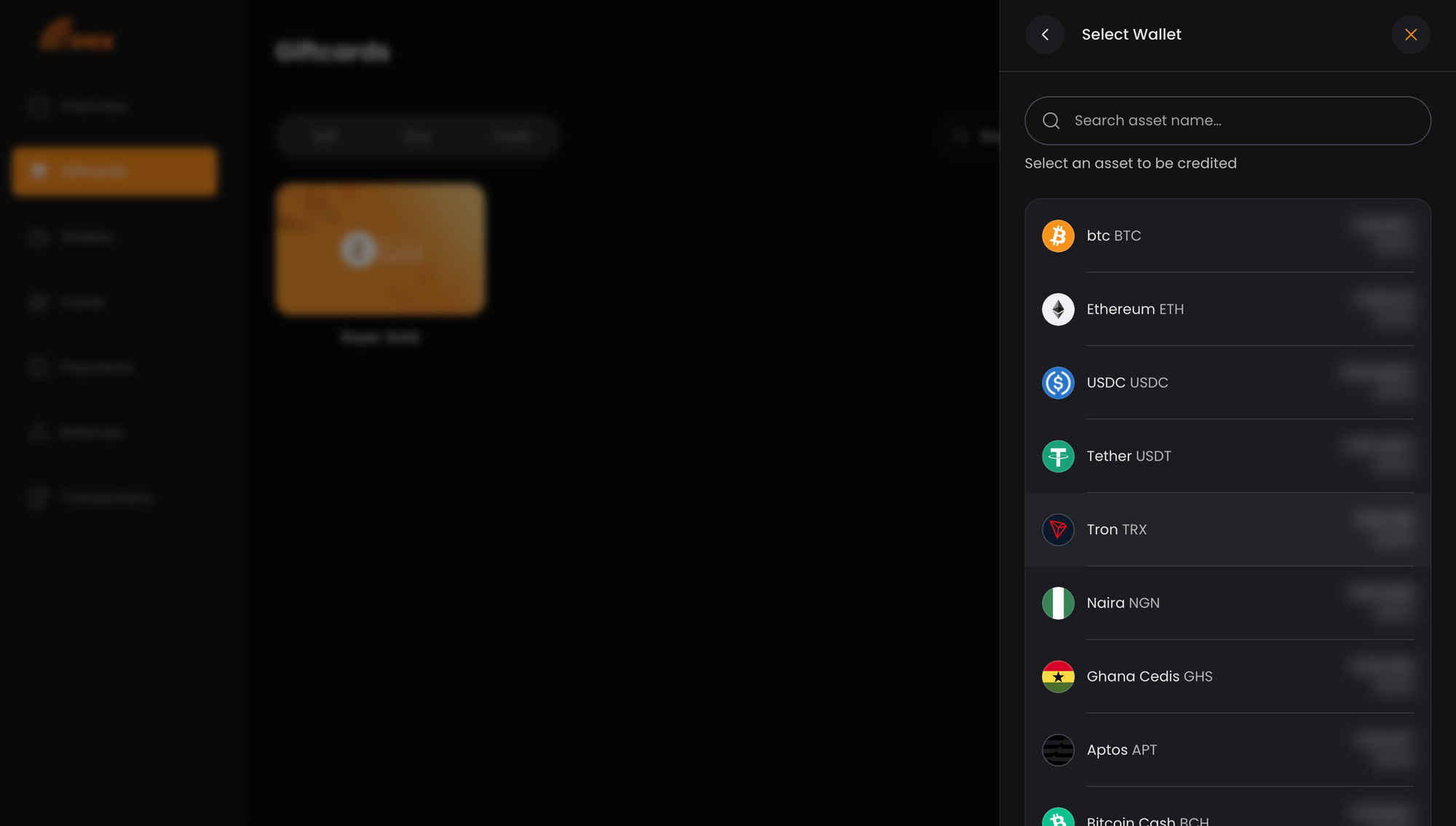
Step 9. Choose the wallet where you want to receive your payment.
Step 10. Select the card type: Physical or E-Code.
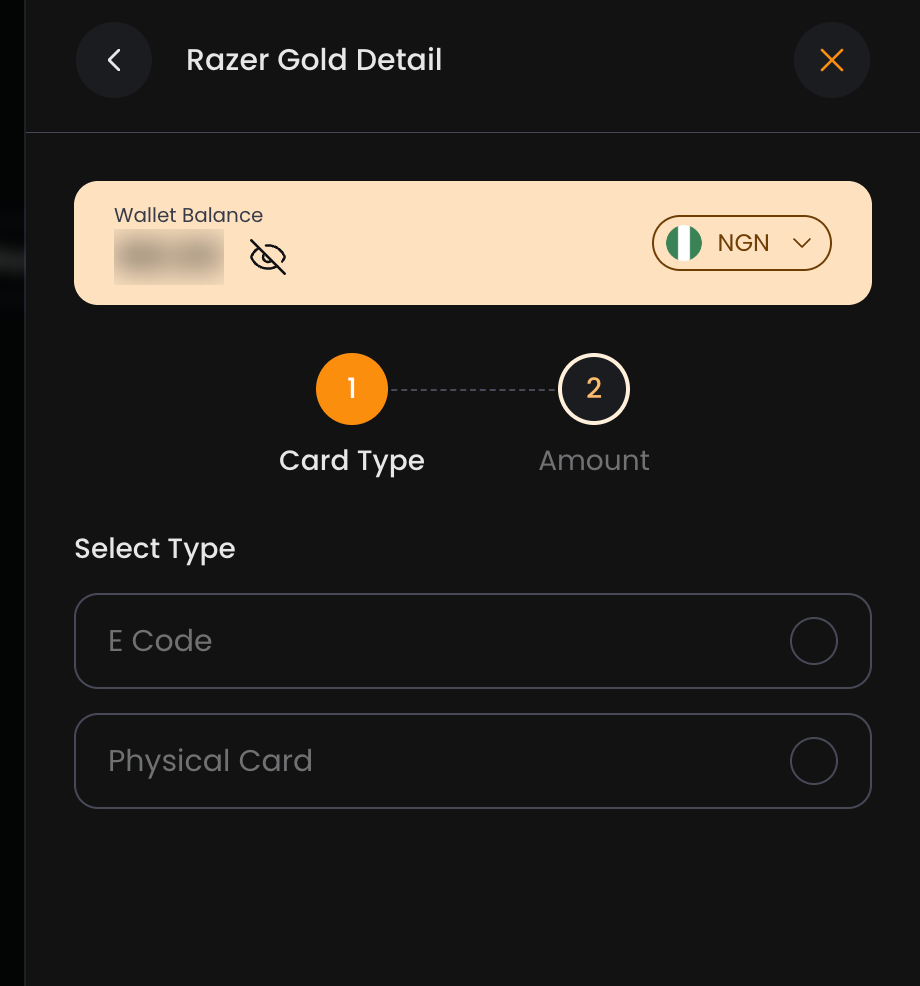
Step 11. Enter the gift card amount.
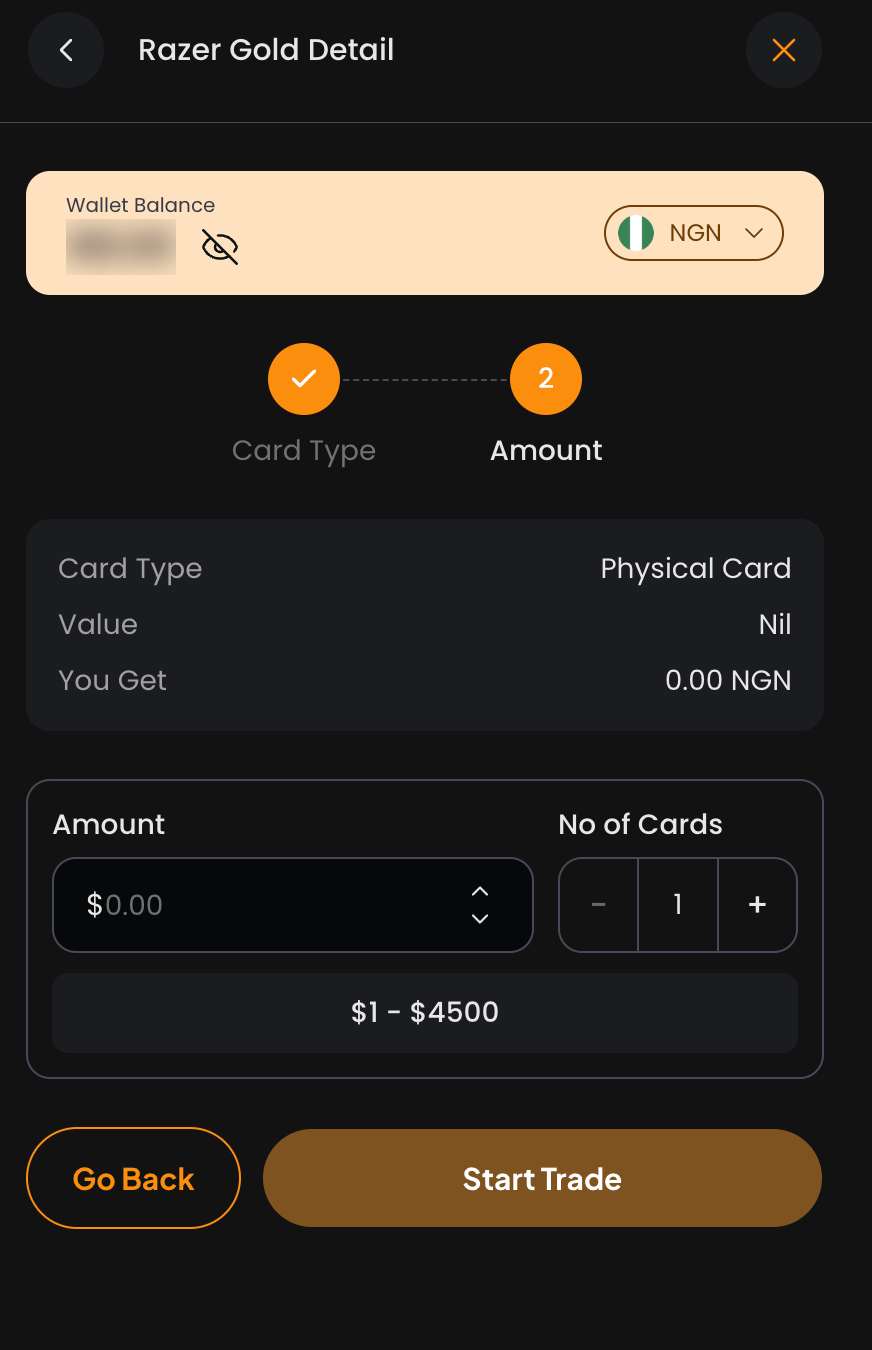
Step 12. Tap Start Trade.
For physical cards, you may be asked to upload clear images of the card.
Once the trade has been reviewed and successfully completed, your Apex Network wallet will be credited.
You can then withdraw your available funds to your bank account using the supported withdrawal option.
Ready to sell your Razer Gold gift card?
Trade your Razer Gold gift card on Apex Network.
14. Common Razer Gold Gift Card Problems and Solutions
Sometimes, users experience difficulties when redeeming or using Razer Gold PINs.
Here are some common problems and what to do.
If a PIN does not work, avoid repeatedly sharing it with different people or attempting to sell it without understanding the issue.
Keep your purchase receipt and other supporting information until the problem is resolved.
15. Frequently Asked Questions About Razer Gold Gift Cards
1. What is a Razer Gold gift card used for?
A Razer Gold PIN can be used to reload a compatible Razer Gold wallet or make direct top-ups at participating merchants. Razer Gift Cards have separate redemption options, including eligible purchases on Razer.com and wallet reloads where supported.
2. Can I sell my Razer Gold gift card for cash in Nigeria?
Yes. You can sell supported Razer Gold gift cards through gift card trading platforms such as Apex Network. Your payout depends on the card's region, type, denomination and the current trading rate.
3. How much is a $100 Razer Gold gift card in Naira?
The Naira value of a $100 Razer Gold card depends on its type, region and the platform's current rate. Visit the Apex Network rate calculator to check the estimated payout.
4. Do Razer Gold gift cards expire?
Razer Gold wallet balances do not expire. However, Bonus Razer Gold obtained from promotions and contests generally expires within 30 days. Razer Gold PINs and other gift card products may have separate validity terms, so check the specific product conditions.
5. Can I reload a Razer Gold gift card?
A Razer Gold PIN is a prepaid code used to reload a compatible wallet. Once redeemed, the code itself is not reloaded. You can add more funds through another supported PIN or payment method.
6. Why is my Razer Gold PIN not working?
Common reasons include entering the wrong code, using the serial number instead of the PIN, a previously redeemed code or a mismatch between the PIN's region and your wallet region.
7. Can I use a US Razer Gold PIN in Nigeria?
A US Razer Gold PIN is intended for a compatible US-region wallet. It should not be assumed to work with a wallet registered in another region. Confirm the wallet requirements before purchasing or redeeming it.
8. What is the difference between a Razer Gold physical card and an e-code?
A physical card is a printed card containing a redemption code, while an e-code is delivered electronically. Both formats may contain redeemable codes, but availability and trading rates can differ.
9. Can I check my Razer Gold balance without redeeming the PIN?
Balance-checking options depend on the specific Razer product. An unused Razer Gift Card may have an official balance-checking option, while a redeemed Razer Gold PIN becomes part of your wallet balance. Check the relevant Razer support instructions.
10. Does Razer Gold support all games?
No. Razer Gold is accepted by participating games and entertainment merchants. Check the official Razer Gold catalogue to confirm whether your preferred game supports it.
Conclusion
Razer Gold provides gamers with a convenient way to pay for supported games, in-game content and digital entertainment. Whether you want to purchase a PIN, redeem a card, check your wallet balance or understand regional restrictions, knowing how the system works can help you avoid common problems.
If you own a Razer Gold gift card you no longer need, you can also exchange supported cards for cash through Apex Network.
Check the latest trading rate, select your card details and complete your trade.
Have a Razer Gold gift card to sell?
Trade your Razer Gold gift card on Apex Network and receive your payout after a successful trade.