
Buy Apple Gift Cards (iTunes) in Nigeria: Where to Buy Online on Apex Network

If you want to subscribe to Apple Music, download paid apps, purchase games, pay for iCloud+ or access other Apple services, an Apple Gift Card can be a convenient way to fund eligible purchases.
But where can you buy Apple Gift Cards in Nigeria without going through a complicated international checkout process?
A practical option is Apex Network, where you can access available gift card products, select your preferred purchase options and complete your transaction digitally.
Whether you call it an Apple Gift Card, an iTunes Gift Card or an App Store gift card, this guide explains what these cards are, what you can use them for, how to choose the right region and how to buy one on Apex Network.
What Is an Apple Gift Card?
An Apple Gift Card is a prepaid card that can be redeemed for eligible Apple products, services and digital content. Depending on the card's country or region, its value can be added to your Apple Account balance and used for supported purchases.
You can use an eligible Apple Gift Card for:
- Apps and games: Purchase paid applications, games and eligible in-app content from the App Store.
- Music and entertainment: Buy eligible music, films, books and other digital content.
- Subscriptions: Pay for services such as Apple Music, Apple Arcade and Apple TV, where supported.
- iCloud+: Pay for eligible iCloud+ storage plans.
- Apple products and accessories: In supported countries and regions, use your Apple Account balance to purchase eligible Apple devices and accessories.
The exact products and services you can pay for depend on the card type, your Apple Account's country or region and Apple's applicable terms.
If you are new to these cards, read our guide to What Is an iTunes Gift Card? Everything You Need to Know.
Apple Gift Cards vs iTunes Gift Cards: What's the Difference?
Many people in Nigeria still search for iTunes Gift Cards when looking for a way to fund their Apple Accounts. However, Apple has introduced a unified Apple Gift Card in supported markets, bringing together the functions of its previous Apple Store and App Store & iTunes gift cards.
The older App Store & iTunes Gift Cards have not automatically become invalid. Existing cards can still be redeemed under Apple's applicable terms.
Here is a simple comparison:
Although both card types can provide Apple Account credit, their permitted uses and restrictions depend on the card's terms and region.
This is why you should check the exact card type and country before buying. A card being described as an iTunes Gift Card does not mean it can be redeemed on every Apple Account.
Where Can You Buy Apple Gift Cards in Nigeria?
Where Can You Buy Apple Gift Cards in Nigeria?
If you are in Nigeria and want to buy an Apple Gift Card, you can explore digital gift card platforms that support Nigerian customers.
Some platforms appearing in the Nigerian gift card market include Apex Network, Carry1st, Cardtonic, NOSH and Codashop. Their available products, payment options, denominations and delivery arrangements may differ, so check the current details on each platform before paying.
Apex Network provides a digital platform where users can access available gift card products through their accounts.
To purchase an Apple Gift Card on Apex Network:
- Visit Apex Network or open the platform.
- Log in to your account or create one if you are new.
- Navigate to the Gift Cards section.
- Select the Buy option and look for Apple Gift Card.
- Review the available card options, currency and denominations.
- Complete the purchase using an available payment method.
Before confirming your order, make sure the card's region is compatible with your Apple Account.
You can also read our guide on Where to Buy Apple Gift Cards in Nigeria: US and UK Gift Cards.
Why Buy Apple Gift Cards on Apex Network?
Choosing where to buy a digital gift card matters. You want to understand the price before paying, select the correct card and receive the code through the platform's supported delivery process.
Here are some reasons to consider Apex Network.
1. Digital Gift Card Delivery
Apex Network provides digital gift card transactions, so you do not have to wait for a physical card to arrive by post.
After your payment has been successfully processed, your gift card code is delivered through the platform's supported delivery channel. This is useful when you need a code for personal use or want to send a digital gift to someone.
2. Convenient Payment Options
Apex Network supports multiple payment options across its services. Depending on the options available for your particular transaction, you may be able to pay using:
- Bank transfer
- Cryptocurrency
- Apex Network wallet balance
- Other supported payment methods
The available options can vary by product and transaction. Check the payment methods shown during checkout before proceeding.
3. Transparent Pricing Before Checkout
The amount you pay for an international gift card can depend on its currency, denomination and the applicable rate.
Apex Network allows you to review the available purchase amount and applicable price before confirming your transaction.
Always check the final amount displayed at checkout. Gift card prices and rates can change, so avoid relying on an old screenshot or a price quoted elsewhere.
For more information about card values, see our guide to iTunes Gift Card Denominations and Prices in Nigeria.
4. A Straightforward Purchase Process
You do not need specialist technical knowledge to buy a gift card.
The platform guides you through selecting the gift card, choosing the available currency and amount, reviewing the transaction and completing payment.
5. Access to Other Digital Services
Beyond gift cards, Apex Network offers access to other digital services, including cryptocurrency transactions, virtual cards and bill payments.
This gives users access to multiple services through one platform.
Can You Buy US Apple Gift Cards in Nigeria?
Yes. You can buy a US Apple Gift Card from a platform that sells to Nigerian customers. However, buying a US card while living in Nigeria does not mean that you can redeem it with every Nigerian Apple Account.
Apple Gift Cards are country- and region-specific. Apple's terms state that US-purchased gift cards can only be linked to an Apple Account in the United States and used for purchases in the United States.
Before purchasing a US Apple Gift Card, check the following:
- The country or region associated with your Apple Account.
- Whether the gift card is issued for the United States or another country.
- Whether the card type is compatible with your intended use.
- Whether you can meet Apple's requirements for using the relevant storefront.
For example, a US Apple Gift Card is intended for use with a compatible US Apple Account. If your Apple Account is registered to another country, you may receive a region compatibility error when trying to redeem it.
Do not purchase a card simply because it is available in dollars. Confirm that its region matches your account first.
You can read Apple's official explanation of gift card redemption and regional restrictions.
Available Apple Gift Card Denominations and Regions
Apple Gift Cards are issued in different currencies and denominations depending on the country or region.
For example, US gift cards may be available in values such as $10, $25, $50 and $100, depending on the seller's inventory. Other markets may offer different currencies and denominations.
The options available on Apex Network may also vary. To check what you can purchase:
- Log in to your Apex Network account.
- Open the Gift Cards section.
- Select Buy.
- Choose Apple Gift Card.
- Review the available currencies and denominations.
Do not assume that every denomination is always available. Check the options displayed on the platform when you are ready to purchase.
You may also find these guides useful:
- US iTunes Gift Card Rate in Nigeria: Physical and eCode Rates Today
- iTunes Gift Card Rate in Nigeria Today – Apple Gift Card to Naira
- US vs UK vs EU Apple Gift Cards: Which Pays Best in Nigeria?
How to Buy Apple Gift Cards on Apex Network
Ready to purchase an Apple Gift Card? Follow these steps.
Step 1: Visit Apex Network
Visit Apex Network or open the platform and log in to your account.
If you are a new user, follow the registration instructions to create an account.
Step 2. Log in to your account or create one if you are new.
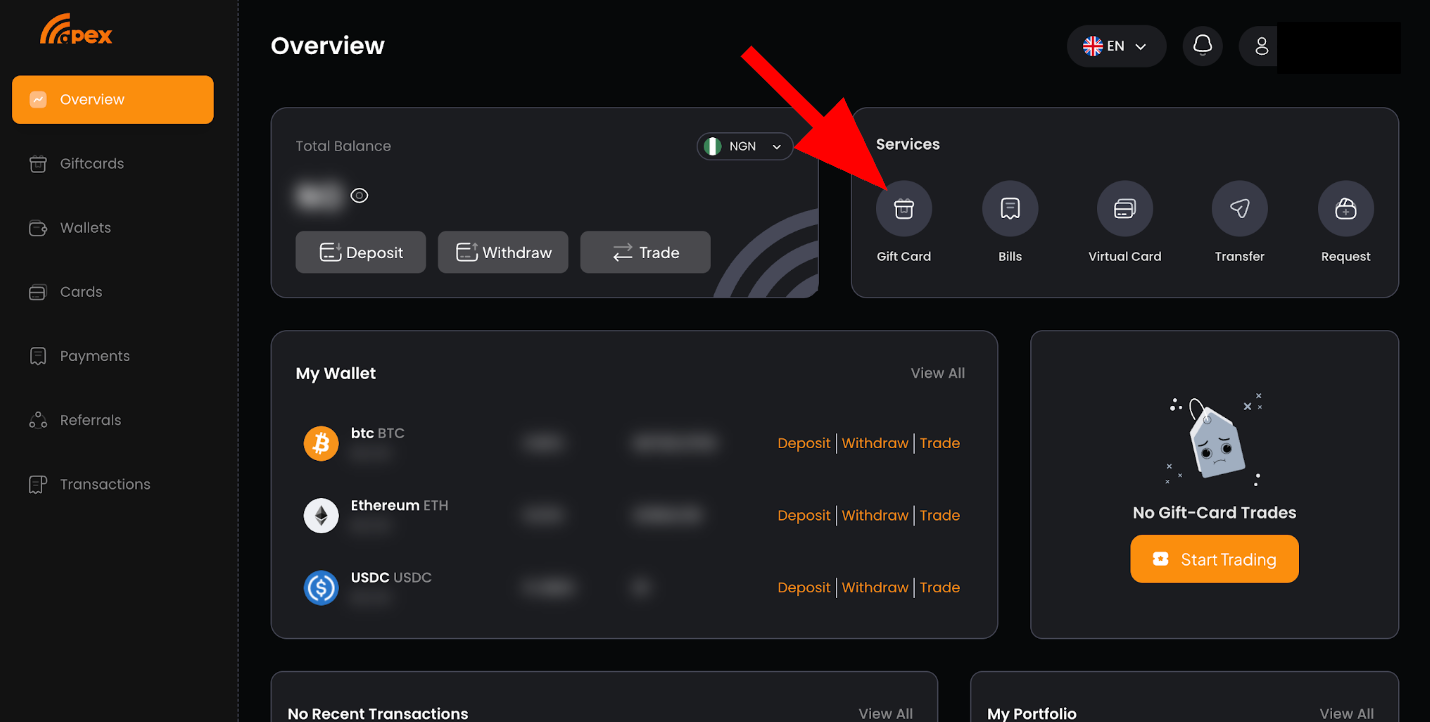
Step 3. Navigate to the Gift Cards section and Tap Gift Card
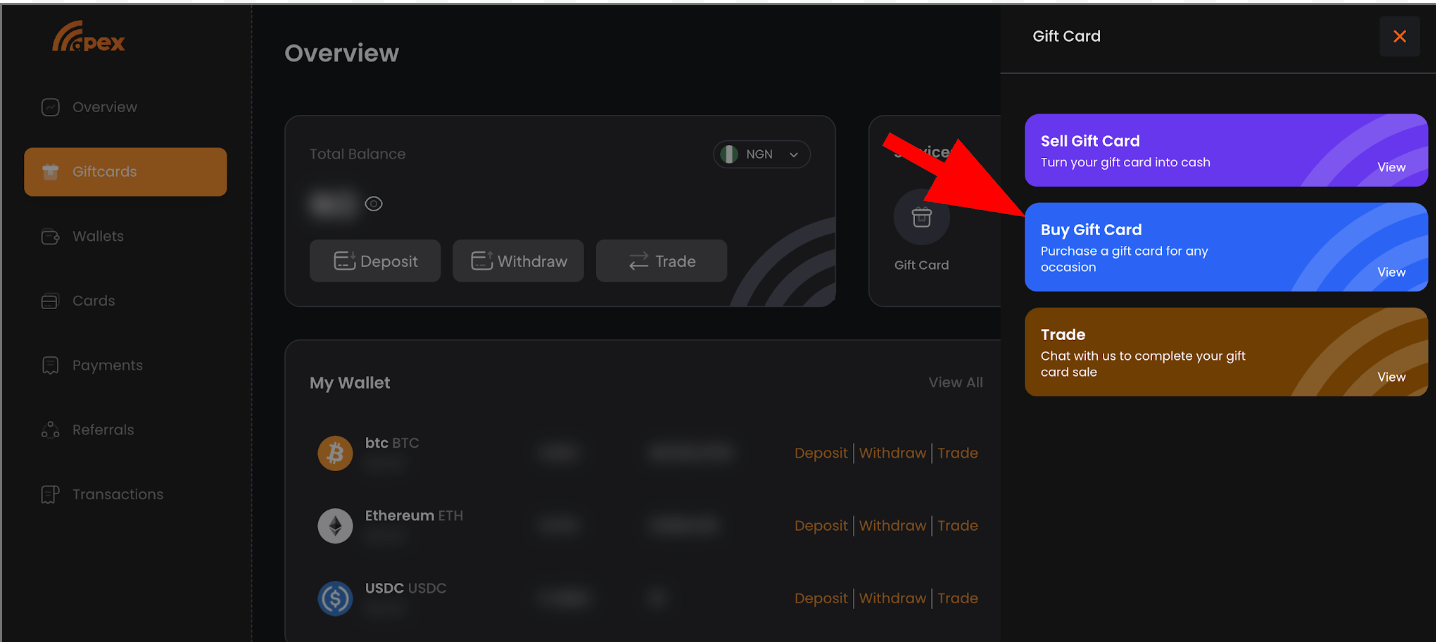
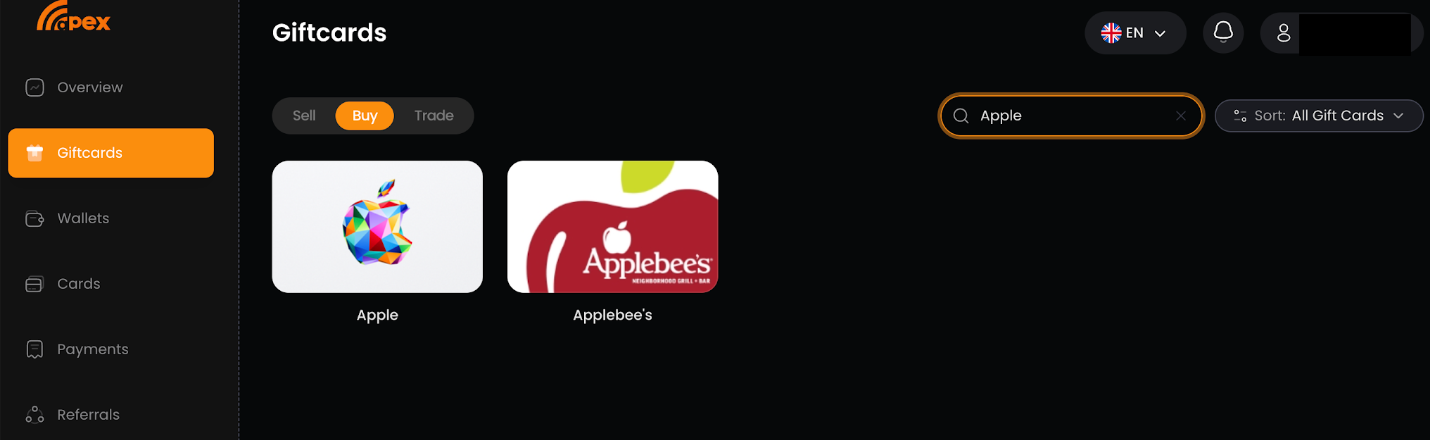
Step 4. Then Tap Buy Gift Cad
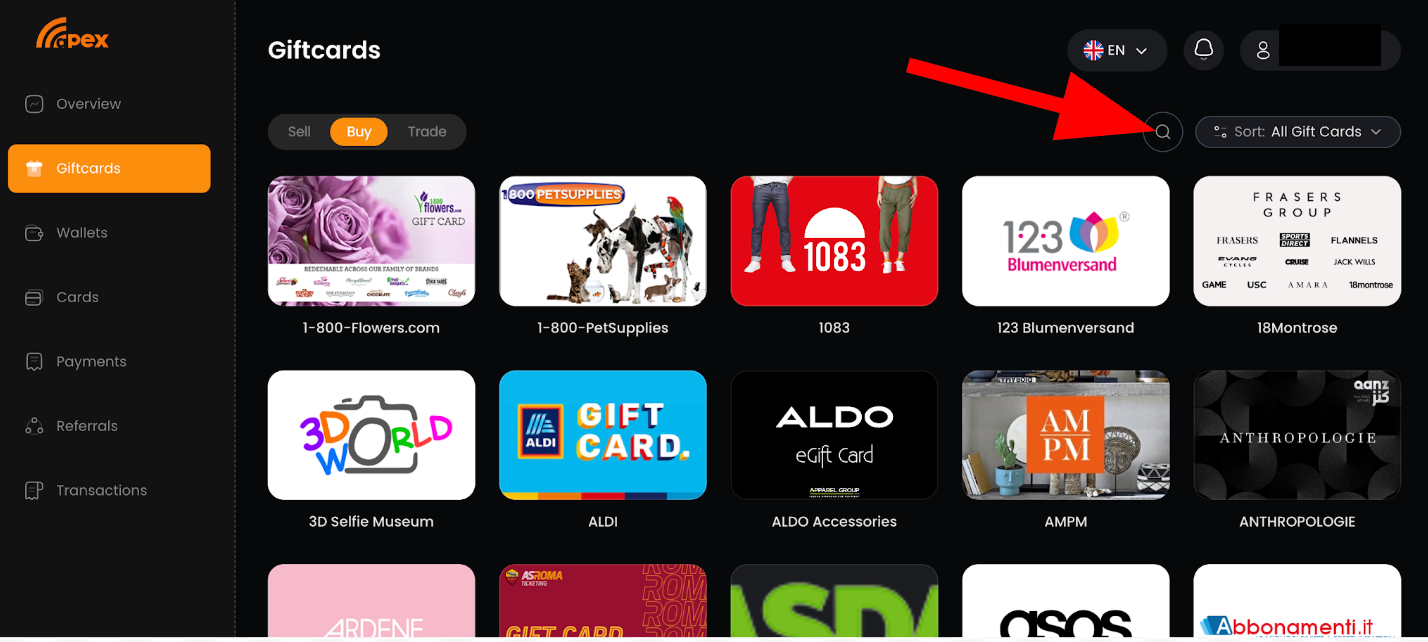
Step 5. Search for Apple/iTune Gift Card then tap Apple Gift Card
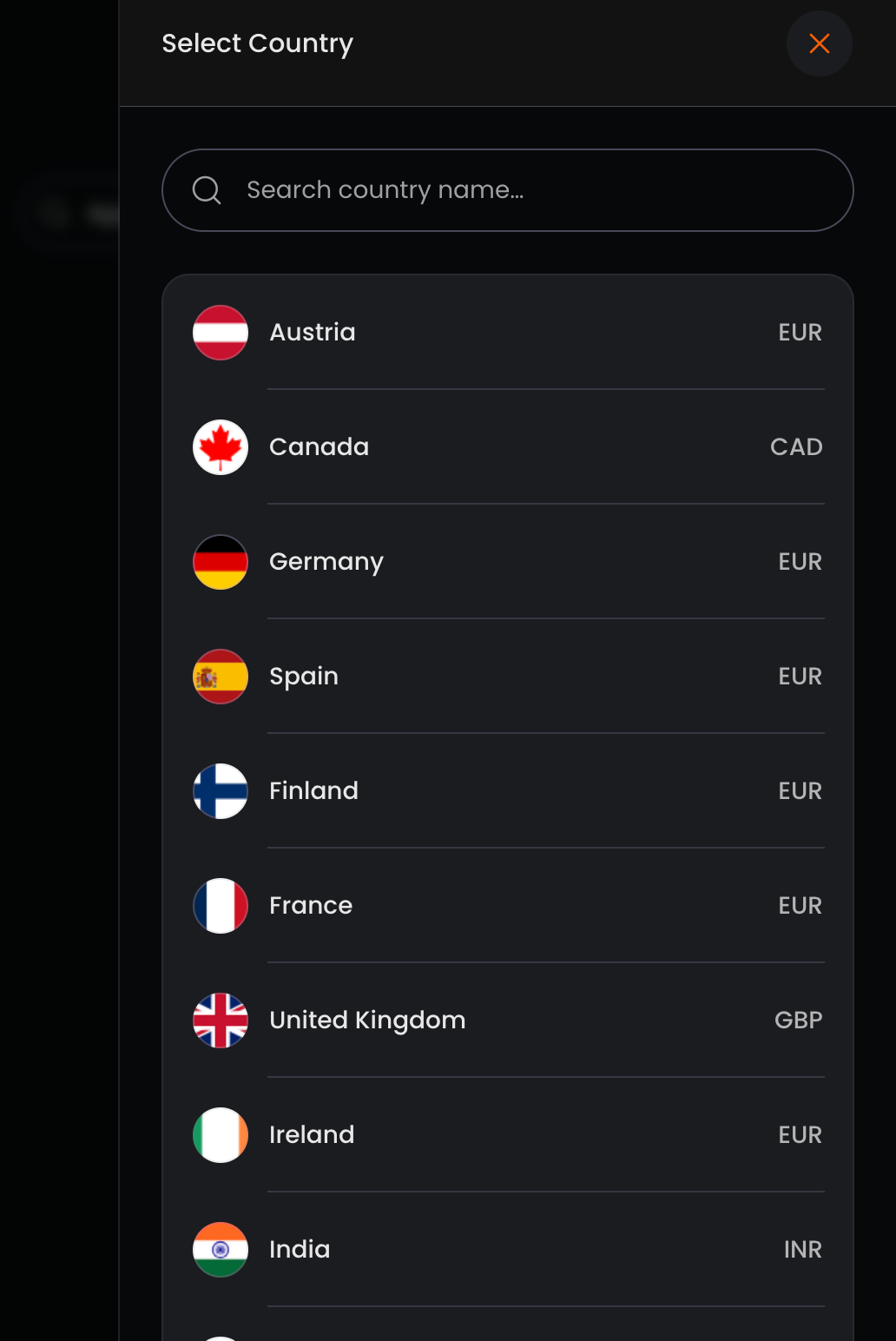
Step 6. Select Country
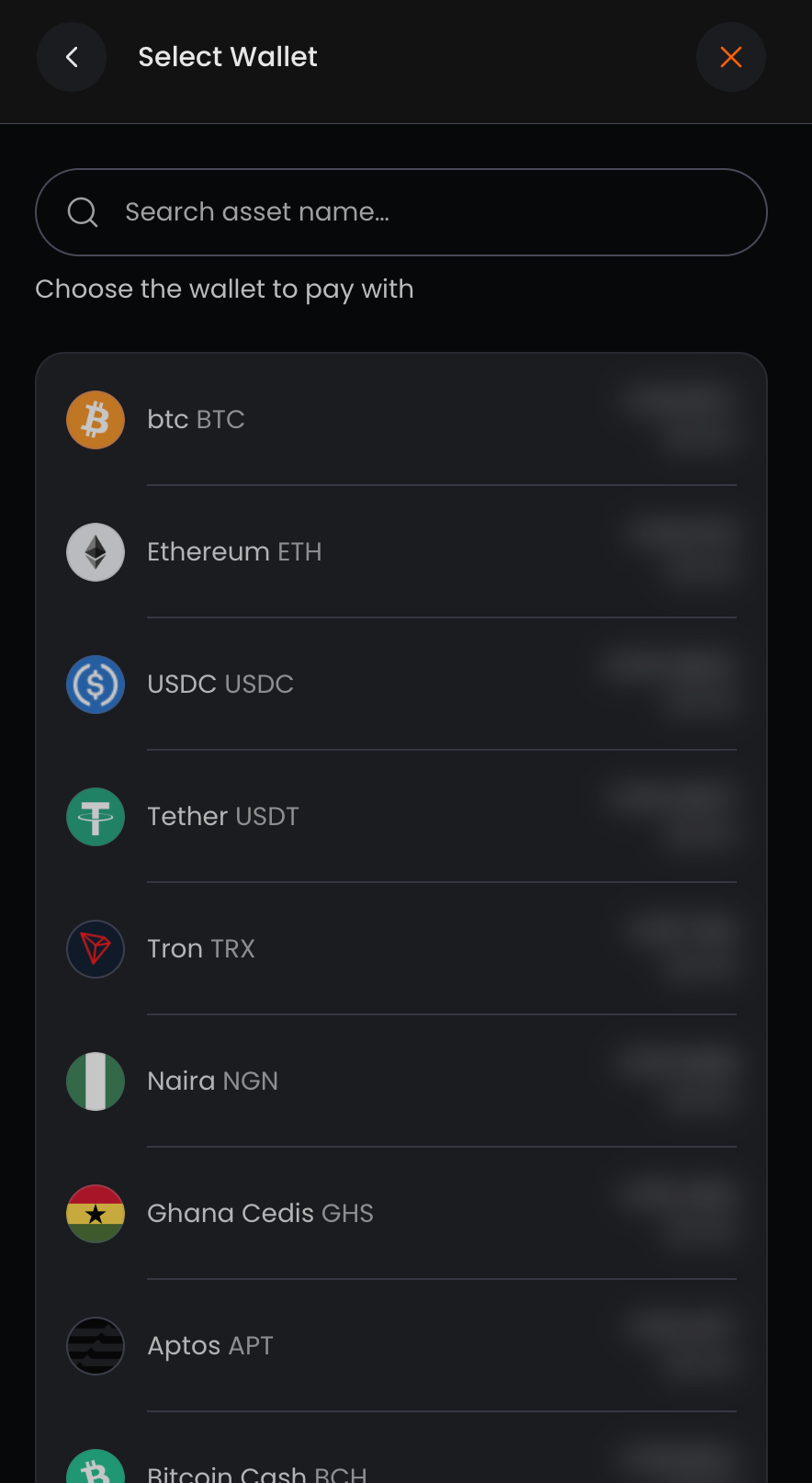
Step 7. Select Wallet
Step 8: Put in Gift Card Amount
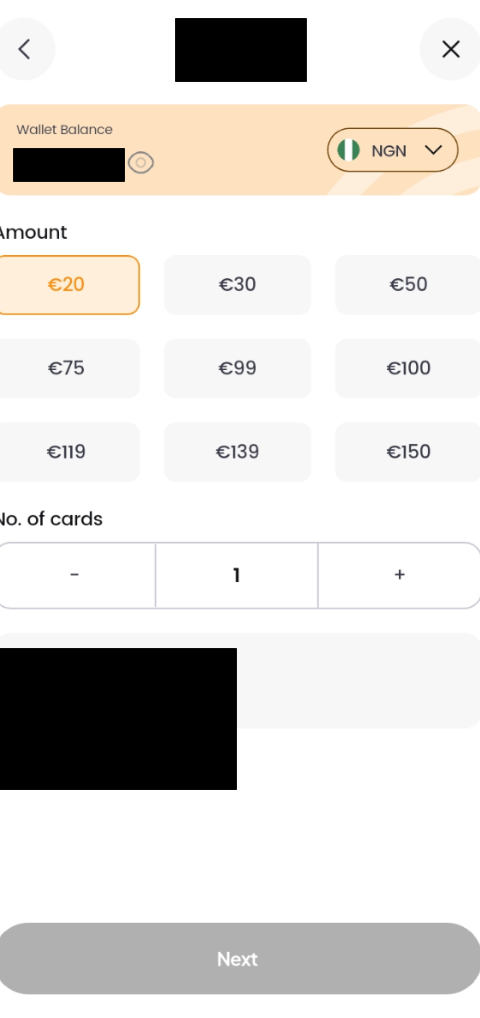
Step 9: Then Tap Start Trade
Before paying, confirm:
- The selected gift card is correct.
- The currency and denomination are correct.
- The number of cards is correct.
- The total amount is accurate.
- The selected payment method is available and correct.
Once you have checked the details, complete the transaction.
After successful payment processing, your Apple Gift Card code will be delivered through the platform's supported delivery channel.
How to Redeem an Apple Gift Card
After receiving your Apple Gift Card code, you can redeem it into your Apple Account balance, provided the card is compatible with your account's country or region.
How to Redeem an Apple Gift Card on an iPhone or iPad
- Open the App Store on your iPhone or iPad.
- Tap your profile picture or account icon.
- Select Redeem Gift Card or Code.
- Choose the option to enter your code manually if necessary.
- Enter the gift card code.
- Follow the instructions on the screen and tap Redeem.
After successful redemption, the value will be added to your Apple Account balance.
How to Redeem an Apple Gift Card on a Windows PC
- Open the Apple Music app or Apple TV app on your Windows PC.
- Sign in to your Apple Account.
- Click your name at the bottom of the sidebar.
- Select Redeem.
- Enter the gift card code and follow the instructions.
- Complete the redemption process.
If you receive your gift card by email, you may also be able to open the email and select Redeem Now, depending on the card and delivery format.
For a more detailed walkthrough, read How to Redeem an iTunes Gift Card Online on iPhone, Android and Windows PC.
How to Check Your Apple Gift Card Balance
After redeeming your gift card, you may want to confirm that the value has been added to your Apple Account.
You can check your balance by signing in to the relevant Apple service with the account you used to redeem the card. On an iPhone or iPad, open the App Store and tap your profile picture to view your account information and balance, where available.
If the balance does not appear immediately, check that you are signed in to the correct Apple Account.
For more detailed instructions, read How to Check Your Apple Gift Card Balance Online.
Common Apple Gift Card Problems and How to Resolve Them
Sometimes, you may encounter an error when trying to redeem an Apple Gift Card. Here are some common problems and what you can do.
1. Invalid Gift Card Code
If Apple says your code is invalid, check that you entered it correctly. Some letters and numbers look similar, so review the code carefully.
Avoid repeatedly guessing the code. If the problem continues, contact the seller or Apple Support with the relevant purchase information.
2. Gift Card Has Already Been Redeemed
If you receive a message that the card has already been redeemed, check your Apple Account balance first. You may have redeemed it previously.
If the value is missing and you believe someone else used the code, contact Apple Support and provide your purchase information.
3. Gift Card Region Does Not Match Your Apple Account
A region mismatch can occur when the card was issued for a different country or storefront from the one associated with your Apple Account.
Check your account's country or region and compare it with the card's issuing region. Apple generally does not allow gift cards to be redeemed outside their country or region of purchase.
4. Gift Card Has Not Been Activated
Some physical gift cards require activation by the retailer at the point of purchase.
If Apple says the card has not been activated, contact the retailer or seller and provide your receipt or transaction details.
5. You Cannot Find Your Redeemed Balance
Make sure you are signed in to the same Apple Account used to redeem the gift card. If the balance still does not appear, sign out of the relevant Apple service and sign back in, then check again.
If you purchased the card through Apex Network and experience a transaction or delivery issue, contact Apex Network support with your transaction details.
For more troubleshooting help, see iTunes Gift Card Invalid Code: 7 Causes and How to Fix It.
How to Avoid Fake Apple Gift Cards and Gift Card Scams
When buying digital gift cards online, be careful about sellers offering unusually low prices, unsolicited codes or deals that seem too good to be true.
Use these precautions:
- Buy from platforms with an established purchase process.
- Confirm the card's country and region before paying.
- Check the denomination and total price carefully.
- Do not share your redemption code with strangers.
- Keep your payment confirmation and transaction details.
- Avoid sending money to individuals who promise to deliver a gift card outside a platform's official process.
A gift card code is valuable once it has been issued. Treat it like cash and keep it private until you are ready to redeem it.
Read our guides on How to Identify Fake iTunes and Apple Gift Cards Before Buying and How to Avoid iTunes Gift Card Scams: 10 Warning Signs to Watch Out For.
Frequently Asked Questions About Buying Apple Gift Cards in Nigeria
1. Can I buy an iTunes Gift Card in Nigeria?
Yes. You can buy Apple or App Store & iTunes gift cards from digital gift card platforms that support Nigerian customers. Check the card's type and issuing region before purchasing because not every card works with every Apple Account.
2. Where can I buy Apple Gift Cards in Nigeria?
You can explore platforms such as Apex Network and other digital gift card sellers that serve Nigerian customers. On Apex Network, log in, open the Gift Cards section, select Buy and check the available Apple Gift Card options.
3. Can I buy US Apple Gift Cards online from Nigeria?
Yes. Some digital gift card platforms sell US Apple Gift Cards to customers in Nigeria. However, a US-issued card is intended for use with a compatible US Apple Account. Confirm your account's region before buying.
4. Can I buy Apple Gift Cards with Naira?
You may be able to pay in Naira through platforms that support local Nigerian payment methods. The available payment methods and final amount depend on the platform and the transaction options displayed at checkout.
5. How long does Apple Gift Card delivery take on Apex Network?
Apex Network delivers purchased gift cards digitally after successful payment processing. Delivery is subject to transaction confirmation and the platform's processing. Check your transaction status and contact support if you experience a delay.
6. What can I use an Apple Gift Card for?
Depending on the card type and region, you can use an eligible Apple Gift Card or its redeemed balance for apps, games, in-app purchases, music, films, subscriptions such as Apple Music and Apple TV, and iCloud+.
In supported markets, Apple Account balance can also be used for eligible Apple products and accessories.
7. Can I use a US Apple Gift Card with a Nigerian Apple Account?
Generally, no. Apple Gift Cards are region-specific. A US-issued card is intended for an Apple Account associated with the US storefront. Check your account's country or region before purchasing.
8. Are Apple Gift Cards refundable?
Apple gift cards are generally not redeemable for cash or refundable, except where required by applicable law. Check the seller's terms and confirm your order details before paying.
9. Can I pay for Apple Gift Cards with cryptocurrency?
Apex Network supports cryptocurrency transactions for selected services and purchases. However, payment options may vary by product. Check the options displayed during your Apple Gift Card purchase to confirm whether cryptocurrency is available.
10. Is Apex Network safe for buying Apple Gift Cards?
Apex Network provides a digital platform for purchasing gift cards and other services. To protect your transaction, use the platform's official purchase process, verify the card details before paying and keep your transaction confirmation.
Buy Apple Gift Cards in Nigeria on Apex Network
Whether you want to pay for Apple Music, download paid apps, purchase games or manage your iCloud+ subscription, an eligible Apple Gift Card can help you fund supported Apple purchases.
The important thing is to choose the correct card, confirm its country or region and buy from a platform that clearly shows the available purchase options.
With Apex Network, you can access available Apple Gift Cards, review the applicable price, select your payment option and receive your code digitally after successful payment processing.
Ready to buy an Apple Gift Card? Visit Apex Network, log in to your account, open the Gift Cards section and check the available Apple Gift Card options before completing your purchase.